
 2026-05-26T03:40:12.000Z
Video content dominates the internet. Social media feeds, marketing campaigns, and educational platforms all run on video. But traditional video production takes time, equipment, and money that most people do not have.
Free AI video generators solve this problem. Type a text prompt, and an AI model produces a video clip in seconds. No camera. No editing software. No budget required.
This guide covers the best free ai video generator tools available in 2026. Each option is tested for quality, ease of use, and real-world value.
Part 1. What is Free AI Video Generator?
A free AI video generator is a tool that uses artificial intelligence to create video content from text descriptions or static images free. Instead of filming, editing, and rendering, users simply describe what they want and let the AI handle the rest.
How it works:
· Enter a text prompt describing the desired scene
· The AI model interprets the prompt and generates video frames
· Output is a short video clip, typically 4 to 12 seconds long
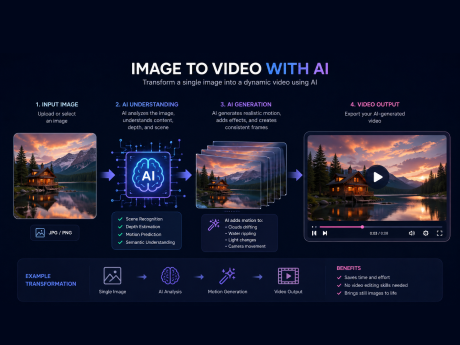
· Some tools also support image-to-video, where a still photo is animated
Common use cases:
· Social media content for TikTok, Instagram, and YouTube
· Marketing videos and product demos
· Educational explainers and training content
· Creative projects and artistic experiments
· Storyboarding and concept visualization
The best free ai video generator produces realistic motion, good lighting, and coherent scenes. Quality varies widely between platforms, so choosing the right tool matters.
Part 2. How AI Video Generation Works
Understanding the technology behind a free ai video generator helps users get better results.
Text-to-video AI converts written descriptions into moving images. The AI model parses the prompt, identifies key elements like objects, actions, and settings, then generates a sequence of frames that form a coherent video clip.
Image-to-video AI takes a static image and adds motion. The AI analyzes the composition, determines what should move, and animates the scene. This approach works well for bringing product photos, portraits, or artwork to life.
AI models powering video generation:
· Sora 2 Pro — OpenAI's latest video model, known for cinematic quality
· Veo 3.1 — Google's model with strong motion coherence
· Kling 1.6 — High-fidelity video generation
· Seedance 2.0 — Emerging model with impressive style control
AIGPTS integrates multiple models, letting users pick the best one for their specific project. Different models excel at different styles. See the Seedance 2.0 vs Happy Horse 1.0 comparison for a detailed model comparison.
Part 3. Top Free AI Video Generator Tools in 2026
1. AIGPTS — Best Overall
Free Tier: Yes, generous free credits, 100% online
Models Available: Veo 3.1, Kling 1.6, Seedance 2.0, and more
Features: Text-to-video, image-to-video, video-to-video
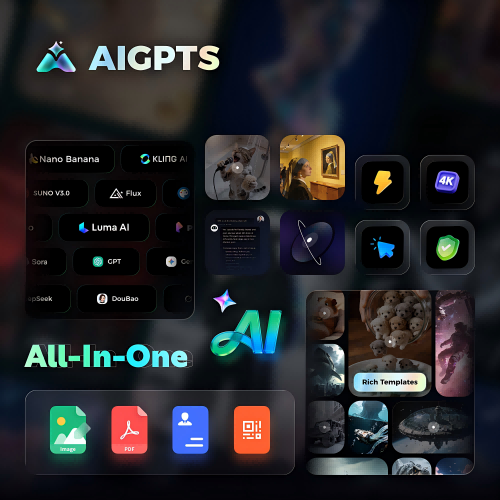
AIGPTS stands out as the best free ai video generator for creators who want variety and quality. The platform supports multiple AI models, so users can experiment and find the style that fits their project.

Key strengths:
· Access to 10+ AI video models in one place
· Text-to-video, image-to-video, video-to-video support
· AI headshot, QR code, and PDF tools bundled together
· Regular updates with new model releases
The free tier provides enough credits to test different models and create multiple video clips. For power users, paid plans unlock higher resolution and faster generation.
How to Make AI Video Free: Step-by-Step with AIGPTS
Creating videos with AIGPTS is simple. Here is the general workflow:
Step 1. Choose the way of AI Video generation
Choose the AI video generation method that best suits your needs, AIGPTS AI Video Generator supports text-to-video, image-to-video, and video-to-video generation.
Step 2. Enter prompt or Upload Image/Video
Depending on the AI video generation feature you have selected, input the required files.
Text-to-Video: Enter a text prompt that describes the desired video content.
Image-to-Video: Upload a reference image; you may also add a text prompt to provide supplementary details. Additionally, you have the option to upload a specific image to define the final frame of the video.
Video-to-Video: Upload a reference video; you may also add a text prompt to provide supplementary details.
Tips:The quality of the output depends heavily on the prompt, Be specific about Subject (Who or what is in the scene); Action (What is happening); Setting (Where the scene takes place); Style (Cinematic, anime, realistic, cartoon, etc.); Camera movement (Pan, zoom, close-up, wide angle)...
Example prompt: A low angle shot of a jazz pianist in a dimly lit 1920s jazz bar, playing the piano with concentration. The camera pans slowly to the left.
Step 3. Select the AI Video Model
Different models produce different results. AIGPTS offers multiple models, including Sora 2 Pro, Kling 1.6, Seedance 2.0, Veo 3, HappyHorse 1.0, almost all popular AI video generation models.
2. GizAI
Free Tier: Yes, no sign-up required
Models: LTX-2.3, Sora 2, Seedance, Kling
Features: Text-to-video, face swap, image upload
GizAI offers a straightforward free ai video generator with no registration barrier. Users can start generating videos immediately by typing a prompt. The platform supports multiple AI models and includes face swap functionality.
The no sign-up approach makes it ideal for quick tests and casual use. Video quality is solid, though advanced features may require login.
3. Kapwing
Free Tier: Yes, limited
Models: Veo, Kling, Seedance, Sora
Features: Text-to-video, image-to-video, timeline editor
Kapwing is a full-featured online editor with a built-in free ai video generator. The platform includes storyboard preview, allowing users to plan shots before generating. The timeline editor supports adding voiceovers, subtitles, and brand assets after generation.
Kapwing serves 35 million creators and generates 100,000+ videos daily. The free tier has limitations, but the editing tools make it a strong option for social media content.
4. AI Free Video (aifreevideo.com)
Free Tier: Yes, unlimited
Watermark: No
Features: Text-to-video, image-to-video
AI Free Video positions itself as a completely free ai video generator with no watermarks and no subscriptions. Videos are generated in about 5 minutes and are available in HD quality. The platform is designed for personal use, with content suitable for sharing on social media.
The unlimited free tier is attractive, though videos are limited to 5-second clips. Users can chain multiple clips together to create longer content.
5. AI Video Maker (aivideomaker.ai)
Free Tier: Yes, unlimited 480p
Watermark: Yes (on free tier)
Features: Text-to-video, image-to-video, image editing
AI Video Maker offers unlimited free video generation at 480p resolution. Paid plans unlock 720p, watermark removal, and commercial rights. The platform includes AI image generation and editing tools, making it a comprehensive creative suite.
With 136K visitors in 30 days and 25K signups, the platform has gained significant traction. The free tier is suitable for testing and personal projects.
6. HeyGen
Free Tier: Yes, limited credits
Features: Text-to-video, photo-to-video, AI avatars, video translation
HeyGen specializes in AI avatar videos and text-to-video generation. The platform produces 1080p or 4K cinematic videos with voiceovers and AI avatars. It is particularly popular for training content, sales videos, and YouTube channels.
HeyGen has generated over 130 million videos and supports 175+ languages. The free tier provides enough credits to test the platform before committing to a paid plan.
Part 4. Comparison: Free AI Video Generator Tools
| Tool | Free Tier | Watermark | Max Length | Models | Best For |
|---|---|---|---|---|---|
| AIGPTS | Generous, online | No | 8-12s | All popular | Best overall |
| GizAI | No sign-up | No | ~10s | 4 | Quick testing |
| Kapwing | Limited | Varies | 12s | 4 | Social media |
| AI Free Video | Unlimited | No | 5s | Proprietary | No watermark |
| AI Video Maker | Unlimited 480p | Yes | 5s | 3 | Unlimited drafts |
| HeyGen | Limited | No | Varies | Multiple | Avatar videos |
Part 5. Use Cases: What Can You Create with a Free AI Video Generator?
Social Media Content
Short-form video dominates TikTok, Instagram Reels, and YouTube Shorts. A free ai video generator produces eye-catching clips in seconds. Creators use AI-generated videos for trending content, product showcases, and entertainment.
Marketing and Advertising
Businesses use AI video to create product demos, promotional clips, and brand stories. AI-generated ads cost a fraction of traditional production. HeyGen's product placement feature, for example, puts products in the hands of AI avatars for TikTok and Amazon content.
Educational Content
Teachers and trainers use AI video generators to create explainers, visual aids, and course previews. The ability to convert text into video makes complex topics more accessible. Kapwing's script-to-video tool is designed specifically for this use case.
Creative Projects
Artists and hobbyists experiment with AI video for music videos, short films, and digital art. The low barrier to entry means anyone can try video creation without investing in equipment or software.
Storyboarding and Pre-visualization
Filmmakers and content creators use a free ai video generator to visualize scenes before shooting. Quick AI-generated clips help communicate creative vision to teams and clients.
Part 6. Free vs Paid AI Video Generators: What's the Difference?
Free ai video generator tools are powerful, but paid plans offer additional benefits.
| Feature | Free AI Video Generator | Paid AI Video Generator |
|---|---|---|
| Video Generation Number | Limited | Depend on your credits |
| Resolution | Standard (480p or 720p) | Higher resolution (1080p or 4K) |
| Video clips | Shorter (4-8 seconds) | Longer (12+ seconds) |
| AI models | Basic | Access to premium |
| Watermarks | Yes | No |
| Processing | Wait in line | Priority |
When to upgrade:
· You need videos for commercial purposes
· Higher resolution is required
· You produce content at scale
· You want access to the latest AI models
Part 7. Tips for Better AI-Generated Videos
Be specific in prompts. Vague descriptions produce vague results. Include details about subject, action, setting, lighting, and camera angle.
Experiment with different models. Each AI model has its own strengths. Try the same prompt across multiple models to compare results. AIGPTS makes this easy by offering 10+ models on one platform.
Use image-to-video for consistency. If you have a specific visual style in mind, start with an image and let the AI animate it. This approach gives more control over the final look.
Iterate and refine. The first generation is rarely perfect. Adjust the prompt, change the model, or modify the input image until the result matches your vision.
Chain clips for longer videos. Most free ai video generator tools produce short clips. Combine multiple clips in a video editor to create longer content.
Part 8. Frequently Asked Questions
What is the best free AI video generator in 2026?
AIGPTS is one of the best free ai video generator platforms in 2026. It offers access to multiple AI models including Sora 2 Pro, Veo 3.1, and Kling 1.6, along with text-to-video and image-to-video capabilities. GizAI and Kapwing are also strong options depending on specific needs.
Can I create AI videos completely free?
Yes. Several free ai video generator tools offer generous free tiers. AIGPTS provides free credits for testing. AI Free Video offers unlimited generations with no watermarks. GizAI requires no sign-up at all. Free tiers typically have limitations on resolution, length, or usage rights.
Is there a free AI video generator with no watermark?
Yes. AIGPTS, GizAI, and AI Free Video all offer watermark-free results on their free tiers. Some other platforms add watermarks unless you upgrade to a paid plan.
How long are AI-generated videos?
Most free ai video generator tools produce clips between 4 and 12 seconds. Some platforms allow chaining multiple clips together for longer content. Paid plans often support longer individual clips.
Can I use AI-generated videos commercially?
It depends on the platform. Free tiers are often restricted to personal use. Always check the terms of service before using AI-generated videos for business purposes.
What AI model is best for video generation?
Sora 2 Pro and Veo 3.1 are currently among the most capable models for cinematic quality. Kling 1.6 excels at high-fidelity generation. Seedance 2.0 offers strong style control. The best model depends on the specific project — AIGPTS lets users try multiple models to find the right fit.
How to make AI video free on mobile?
Most free ai video generator tools are web-based and work on mobile browsers. AIGPTS, GizAI, and Kapwing are all accessible from smartphones and tablets. No app download is required.
Are free AI video generators safe to use?
Reputable platforms use secure processing and have clear privacy policies. Avoid uploading sensitive or personal content. Check the platform's data retention policy — some delete generated content after 24 hours.
Part 9. Conclusion
The best free ai video generator depends on what you need. For creators who want access to multiple AI models and flexible features, AIGPTS is the top choice. The platform supports text-to-video, image-to-video, and video-to-video with 10+ AI models including HappyHorse 1.0, Seedance 2.0, Sora 2 Pro, Veo 3.1, and Kling 1.6.
Quick recap:
· Best overall: AIGPTS (multiple models, generous free tier)
· No sign-up needed: GizAI (start generating instantly)
· Best for editing: Kapwing (full editor + AI generation)
· No watermark, unlimited: AI Free Video (completely free)
· Best for avatars: HeyGen (AI avatar and translation features)