

 2026-04-13T07:18:43.000Z
Quick Verdict
**Overall Rating:** ★★★★☆ (4.3/5)
**Leonardo AI** is one of the most versatile AI image generators in 2026, offering multiple models, custom training, and a generous free tier. It's perfect for creators who want control over their AI art without Midjourney's Discord complexity. However, the learning curve is steeper than simpler tools, and premium features require paid plans.
**Best for:** Digital artists, game designers, marketers, AI enthusiasts
**Not ideal for:** Casual users wanting quick results, budget-conscious beginners
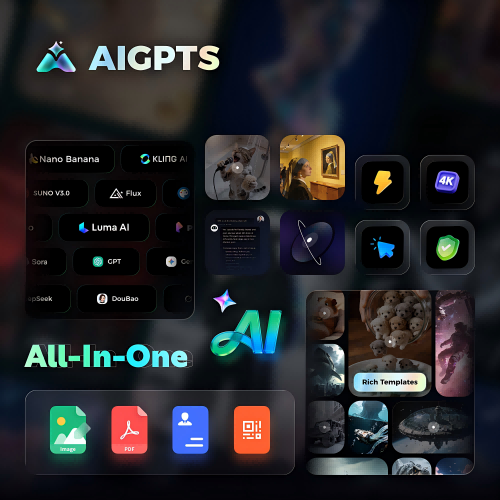
**Top Alternative:** AIGPTS offers multiple AI models (Nano Banana, Kling, Midjourney) with simpler workflows and competitive pricing for professional use.
What Is Leonardo AI?
**Leonardo AI** (leonardo.ai) is a comprehensive AI image generation platform launched in 2022. Unlike single-model tools, Leonardo provides access to multiple AI models—including its own proprietary models and fine-tuned versions of Stable Diffusion.
The platform stands out for features like custom model training, real-time canvas editing, and motion (video) generation. With over 3 million users, Leonardo has built a strong community and continues to add new capabilities regularly.
In 2026, Leonardo AI remains a top choice for creators who want professional-grade AI image generation with granular control.
Key Features of Leonardo AI
1. Multiple AI Models
Leonardo doesn't rely on a single model. Users can choose from:
· Leonardo Phoenix: Latest proprietary model (2026), excellent prompt adherence
· Leonardo Vision: Balanced quality and speed
· Stable Diffusion XL: Open-source powerhouse
· Flux Models: High-quality photorealistic outputs
· Custom Models: Train your own models on specific styles
This variety lets users pick the right model for each project.
2. Custom Model Training
One of Leonardo's standout features: train custom AI models on your own images.
How it works:
· Upload 10-50 images of a specific style, character, or product
· Leonardo trains a custom model (takes 30-60 minutes)
- Use your custom model for consistent outputs
Use cases:
· Character consistency for games or comics
· Brand-specific visual styles
· Product photography with consistent lighting
3. Real-Time Canvas (AI Canvas)
Leonardo's Canvas lets you edit AI images in real-time:
· Inpainting: Paint over areas to regenerate them
· Outpainting: Extend images beyond original borders
· Layer support: Work with multiple layers
· Sketch-to-image: Draw rough sketches, AI renders them
This feature bridges the gap between AI generation and traditional digital art tools.
4. Motion (Video Generation)
Leonardo introduced motion generation in 2025, allowing users to:
· Convert static images to short video clips (2-4 seconds)
· Control motion intensity and direction
· Apply camera movements (zoom, pan, rotate)
Video quality is decent but not industry-leading. Best for social media content, not professional productions.
5. Elements (Style Presets)
Elements are Leonardo's version of LoRAs—pre-trained style modifiers you can apply to any generation:
· Artistic styles (oil painting, watercolor, anime)
· Lighting effects (golden hour, cinematic, studio)
· Texture overlays (grunge, metallic, fabric)
Free users get access to basic Elements; premium unlocks the full library.
6. Prompt Magic & Advanced Controls
Leonardo offers extensive prompt engineering tools:
· Prompt Magic: Auto-enhances your prompts for better results
· Negative prompts: Specify what to exclude
· Guidance scale: Control how closely AI follows your prompt
· Seed control: Reproduce specific outputs
· Tiling: Create seamless patterns for textures
These controls appeal to power users but may overwhelm beginners.
7. Community & Inspiration
Leonardo has an active community feed where users share creations:
· Browse public generations for inspiration
· See prompts used by other creators
· Remix others' work (with permission)
· Participate in daily challenges
The community aspect helps beginners learn effective prompting techniques.
Leonardo AI Models Explained
Understanding Leonardo's model lineup helps you choose the right one:
**Tip:** Start with Leonardo Phoenix for best overall results. Switch to specialized models for specific needs.
Leonardo AI Pricing & Free Tier
Free Plan
What 150 tokens buys you:
· ~70-100 basic image generations per day
· ~30-50 high-resolution generations
· Varies by model and settings
**Verdict:** Generous for casual users. Power users will hit limits quickly.
Annual Discount
All paid plans offer ~20% discount with annual billing.
Is Leonardo AI Free Worth It?
Yes, if:
· You're testing AI image generation
· You need ~50-100 images/day
· You don't need custom model training
· You're okay with standard resolution
Upgrade if:
· You need commercial projects at scale
· You want custom model training
· You need faster generation speeds
· You require premium models (Flux, etc.)
How to Use Leonardo AI: Quick Start
Getting started takes minutes:
· Sign up at https://leonardo.ai (email or Google login)
· Complete onboarding (brief tutorial)
- **Navigate to AI Image Generation**
- **Choose a model** (Phoenix recommended for beginners)
- **Enter your prompt** (be specific)
- **Adjust settings** (resolution, guidance scale, etc.)
- **Click "Generate"** and wait 10-30 seconds
- **Download or edit** your images
Beginner Tips
· Start with preset styles before diving into custom settings
· Use Prompt Magic if you're unsure about prompt engineering
· Check the community feed for inspiration
· Experiment with different models for different projects
Pros & Cons
✅ Pros
**Multiple models:** Access to various AI models in one platform. No need to subscribe to multiple services.
**Generous free tier:** 150 tokens/day is more than most competitors. Commercial use allowed on free plan.
**Custom model training:** Unique feature for consistent character/style generation. Great for game developers and brands.
**Advanced controls:** Extensive settings for power users (guidance scale, seeds, negative prompts).
**Real-time canvas:** Inpainting and outpainting tools rival dedicated photo editors.
**Active community:** Large user base, daily challenges, shared prompts for learning.
**Cross-platform:** Web, iOS, and Android apps with synced accounts.
**Commercial rights:** All plans (including free) allow commercial use.
❌ Cons
**Learning curve:** More complex than simpler tools like Bing Image Creator. Beginners may feel overwhelmed.
**Token system confusion:** Token costs vary by model and settings. Hard to predict how many generations you'll get.
**Premium features locked:** Best models (Flux), custom training, and motion require paid plans.
**Inconsistent quality:** Output quality varies significantly between models. Requires experimentation.
**Slow customer support:** Free users report slow response times for issues.
**Motion quality:** Video generation is basic compared to dedicated AI video tools.
**No unlimited plan:** All plans have token limits. Heavy users may find costs add up.
Leonardo AI vs AIGPTS: Head-to-Head Comparison
When to Choose Leonardo AI
· You want custom model training capabilities
· You need extensive control over generation parameters
· You value a large community and shared resources
· You're comfortable with a learning curve
When to Choose AIGPTS
· You want access to multiple premium models (Midjourney, Nano Banana, FLUX) in one place
· You prefer simpler, more intuitive workflows
· You need professional-grade video generation
· You want competitive pricing for commercial use
Try AIGPTS for streamlined AI image and video generation with top-tier models.

Leonardo AI vs Other Alternatives
vs Midjourney
**Winner:** Leonardo for free tier and features, Midjourney for raw quality.
vs Stable Diffusion (Automatic1111)
**Winner:** Leonardo for convenience, Stable Diffusion for privacy and unlimited free use.
vs Adobe Firefly
**Winner:** Firefly for Adobe users, Leonardo for model variety.
vs Bing Image Creator
**Winner:** Leonardo for commercial use and control, Bing for casual free use.
User Reviews & Community Feedback
What Users Love
"The custom model training is a game-changer for my game dev projects. Character consistency is finally possible." — Reddit user, r/leonardoai
"150 free tokens daily is way more generous than Midjourney's nothing. Perfect for hobbyists." — G2 reviewer
"Canvas editing feature saves me hours in Photoshop. Inpainting works surprisingly well." — CNET comment
"Community feed is incredibly helpful for learning prompts. Found so many great techniques." — Discord member
Common Complaints
"Token system is confusing. Sometimes 10 tokens per image, sometimes 20. Hard to budget." — Reddit thread
"Customer support took 5 days to respond. Not great when you're paying $30/month." — Trustpilot review
"Motion feature is cool but quality isn't there yet. Stick to Runway or Pika for video." — YouTube comment
"Too many settings overwhelm beginners. Wish there was a 'simple mode'." — Product Hunt review
FAQ: Leonardo AI
Is Leonardo AI really free?
Yes, Leonardo AI offers a genuinely free tier with 150 tokens per day. Tokens reset every 24 hours. Free users can access most models and use images commercially. However, premium features (custom training, motion, some models) require paid plans.
How many images can I generate with 150 free tokens?
Approximately 70-100 basic generations per day, or 30-50 high-resolution images. Token cost varies by model, resolution, and settings. Leonardo Phoenix costs more tokens than basic SDXL models.
Can I use Leonardo AI images for commercial purposes?
Yes. All plans, including the free tier, allow commercial use of generated images. You own the rights to your creations. This is a significant advantage over tools like Bing Image Creator (personal use only).
Does Leonardo AI have a mobile app?
Yes. Leonardo AI offers iOS and Android apps with full feature parity to the web version. Your account and tokens sync across all devices. Apps are free to download.
What's the difference between Leonardo AI and Midjourney?
Leonardo AI offers a web interface, free tier, and custom model training. Midjourney operates exclusively through Discord, has no free tier, but is known for superior artistic quality. Leonardo is more feature-rich; Midjourney excels in raw image quality.
Can I train my own models on Leonardo AI?
Yes, but custom model training requires paid plans (Artisan tier or higher, $30/month+). You upload 10-50 images, and Leonardo trains a custom model in 30-60 minutes. Great for character consistency or brand-specific styles.
How does the token system work?
Tokens are Leonardo's usage currency. Different actions cost different tokens:
· Basic generation: 1-2 tokens
· High-resolution: 5-10 tokens
· Custom models: 20+ tokens
· Motion/video: 25+ tokens
Free users get 150 tokens/day. Paid plans include monthly token allowances.
Is Leonardo AI safe to use?
Yes. Leonardo AI is a legitimate company with proper data handling practices. However, avoid uploading sensitive or personal images for custom training. Review their terms of service for data usage policies.
What is Leonardo AI Canvas?
Canvas is Leonardo's real-time editing tool. It allows:
· Inpainting: Regenerate specific areas of an image
· Outpainting: Extend images beyond original borders
· Layer editing: Work with multiple layers
· Sketch-to-image: Convert rough drawings to polished art
Canvas bridges AI generation and traditional digital art workflows.
Does Leonardo AI offer refunds?
Leonardo AI offers refunds within 7 days of purchase if you're unsatisfied. Contact support with your request. Unused tokens from paid plans do not roll over to the next month.
Final Verdict: Should You Use Leonardo AI in 2026?
Yes, if:
· You want a free tier with commercial rights
· You need custom model training capabilities
· You value extensive control over generation
· You're comfortable with a learning curve
· You want an active community for learning
No, if:
· You want the absolute best image quality (Midjourney wins)
· You prefer simple, one-click solutions
· You need unlimited generations (no unlimited plan)
· You want dedicated video generation (use Runway or Pika)
Overall Score: 4.3/5 ⭐
Breakdown:
· Image Quality: 4.5/5
· Ease of Use: 3.5/5
· Features: 5/5
· Pricing: 4/5
· Support: 3.5/5
· Community: 4.5/5
Leonardo AI remains one of the best **all-around** AI image generators in 2026. The free tier is generous, custom model training is unique, and the feature set rivals dedicated professional tools. However, the learning curve and token complexity may frustrate casual users.
Top Alternative Recommendation
For users seeking simpler workflows with access to premium models, consider AIGPTS. You get:
· Multiple top-tier models (Nano Banana, FLUX, Midjourney)
· Streamlined, beginner-friendly interface
· Professional video generation capabilities